XtendLan S/FTP Cat 6A 15 m gray; Patch cable of category Cat 6A with two RJ-45 connectors, for connecting network devices. The cable length is 15 m. BASIC SPECIFICATIONS; Category: Cat 6A...
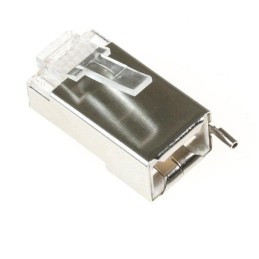
Ubiquiti TC-CON; Shielded RJ-45 8p8c connector. For wire, round cable. Without insert. The highest supported protocol is 1000BASE-T. The contacts are covered with 50 µm gold. BASIC SPECIFICATIONS;...
Microsoft Teams Rooms Standard; Microsoft Teams Rooms is a modern meeting space solution that combines the Microsoft Teams digital workspace with dedicated audio and video devices from Microsoft...
Microsoft Teams Rooms Standard Microsoft Teams Rooms is a modern meeting space solution that combines the Microsoft Teams digital workspace with dedicated Microsoft audio and video devices or third-party devices certified by Microsoft. Teams Rooms is designed to help break down barriers between spaces, places, and people, creating a better Teams meeting experience in any space. Inclusive solutions Host inclusive and interactive meetings for everyone, no matter where they are. Ease of use Create a unified Teams experience designed to make collaboration easier. Flexibility Transform any shared space into a Teams room with a wide range of devices and features. Engage students Organize classes and assignments, collaborate and share files, and access class materials in one place. What's included: A predictable, familiar Teams experience across devices. Experiences with advanced audio and video capabilities help everyone in your meeting feel like they’re in the same room. You can see people and content at the same time—even on the same screen—to help connect people in the room more deeply with virtual meeting participants. With Microsoft voice recognition technology, you can see who’s speaking in the room and use their name in your meeting transcript. When you’re in a meeting room, you can join the meeting using your personal device and use features like chat and live reactions. With a shared digital canvas accessible from any device, you can collaborate with everyone in every meeting in real time. Calendar integration with Exchange, Microsoft 365, and Google. Teams Rooms is available on a variety of device types, including modular kits, compact and integrated devices, and complete all-in-one solutions. Manage your Teams devices and settings in one place with tools for easy setup, inventory management, monitoring, and secure delegated administration. For a list of devices certified for Microsoft Teams Rooms, click HERE. BASIC SPECIFICATIONS License type: for schools, CSP (Cloud Solution Provider) License duration: 1 year subscription (billed monthly) Number of licenses: 1 Comparison of individual Office 365 and Microsoft 365 products: m365map Microsoft 365 Education (complete) Video tutorial on how to set up a school tenant: Cloud Solution Provider (CSP) program Cloud Solution Provider is a comprehensive Microsoft licensing program that allows you to sell to end customers*: cloud service subscriptions - Microsoft 365, Office 365, Windows 365, Dynamics 365, Microsoft Azure license subscriptions - SQL Server, Windows Server perpetual licenses - Office, Windows 10/11, Windows Server, Exchange Server, SQL Server Benefits of the CSP program Monthly rental of the current version of the software with the ability to change the number of licenses on a monthly basis. Annual rental with fixed price for the whole year Easy license management from one place: Office Portal Options for selling CSP products: 1/ Become a CSP product reseller with direct customer management - you handle ordering and managing licenses for your end customers* - suitable for more advanced users 3 steps to become a CSP license reseller: Register for the Microsoft partner network Log in to the CSP program HERE Connect with a CSP license provider HERE After connecting, contact csp@100mega.cz to complete your account setup - we have to set it up manually. 2/ Let your partner do the work - 100Mega will order licenses for your customer for you - we we act as a reseller, we order licenses, we handle everything for the partner, but invoicing takes place 100Mega -> partner -> end customer* The customer needs an account for cloud services, the so-called tenant. If the end customer has a tenant, send it to us at csp@100mega.cz, you will ask the end customer with the tenant to grant delegated administration, we will send you a sample request with a link. If the tenant does not have a tenant, please send information about the end customer to csp@100mega.cz (name, company ID, address, contact person including phone and email). We will create the tenant and send the end customer the data for its administration. * To order CSP licenses, the end customer needs a tenant - an account for managing Microsoft cloud services. If the customer does not have a tenant, the reseller (100Mega) must create a customer in the Partner Center (ALEF platform). The reseller then connects the school tenant - the link can be found in their Partner Center. In the case of establishing an end customer tenant from 100Mega, the connection occurs automatically. An academic customer must have a tenant verified by Microsoft (MS verifies that it is indeed an EDU customer. Detailed instructions for establishing an academic customer can be found HERE. Tip: Validation is faster if the end user provides an email with a domain owned by the school. CSP subscriptions can be modified (reduced, canceled) max. 7 days from the end of expiration. CSP subscriptions are automatically extended unless the partner says otherwise and are extended under the current pricing conditions given by Microsoft and due to exchange rates. The provider is not obliged to inform the partner about these facts in advance; it should be the partner's job to monitor the expirations of its customers and determine their needs and inform the provider about the necessary changes. More information about the CSP program can be found HERE. In case of any questions, please contact csp@100mega.cz
Are you sure that you want to report this comment?
Report sent
Your report has been submitted and will be considered by a moderator.
Your report cannot be sent
Write your review
Review sent
Your comment has been added!
Your review cannot be sent
Price history
Our pricing is always guided by the principles of a fair price. We do not artificially move prices or brag about inflated percentages. You can always find price history for each product.
Lowest price in recent times 30 days was
€23.50
Microsoft Teams Rooms Standard; Microsoft Teams Rooms is a modern meeting space solution that combines the Microsoft Teams digital workspace with dedicated audio and video devices from Microsoft...