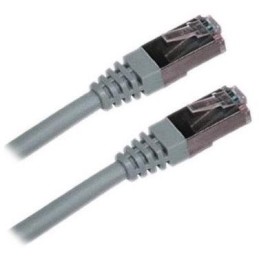
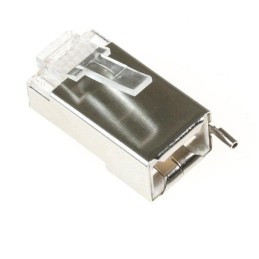
XtendLan S/FTP Cat 6A 15 m gray; Patch cable of category Cat 6A with two RJ-45 connectors, for connecting network devices. The cable length is 15 m. BASIC SPECIFICATIONS; Category: Cat 6A...
Ubiquiti TC-CON; Shielded RJ-45 8p8c connector. For wire, round cable. Without insert. The highest supported protocol is 1000BASE-T. The contacts are covered with 50 µm gold. BASIC SPECIFICATIONS;...
Microsoft 365 Apps for Education; Microsoft 365 Apps for Education lets you install and use the latest full versions of the desktop applications Word, Excel, PowerPoint, OneDrive, Outlook, Teams, Access, Publisher, and...
Microsoft 365 Apps for Education Microsoft 365 Apps for Education lets you install and use the latest full versions of the desktop apps Word, Excel, PowerPoint, OneDrive, Outlook, Teams, Access, Publisher, and OneNote. The license is for 1 user and includes fully installed Office apps on up to five mobile devices, five tablets, and five computers. What's included: Desktop, web, and mobile versions of Microsoft Word, Excel, PowerPoint, Outlook, Teams, Access, Publisher, and OneNote. You get 1 TB of OneDrive online storage per user, so your files are available and synced across all your devices. Each user can use the subscription on up to 15 devices at the same time. Teamwork and communication - online meetings, video calls, and chat with Microsoft Teams. Real-time co-authoring. Automatic app updates with new features and capabilities every month. 24/7 technical support - As a Microsoft 365 subscriber, you can get help directly from Microsoft-trained experts - by phone or chat, at no additional cost. FastTrack assistance. You can count on everything with a 99.9% uptime guarantee with a money-back guarantee. Forms allows you to test and assess the knowledge of students with a verified identity. With Sway, you can easily create impressive interactive documents, presentations, newsletters, training and more. With security and compliance tools, you can be sure that everything is working as it should. A Microsoft account is required to activate the Office product. Learn more HERE. BASIC SPECIFICATIONS License type: for schools, CSP (Cloud Solution Provider) License duration: 1 year subscription (billed monthly) Number of licenses: 1 System requirements PC: Operating system: Windows 11, Windows 10 SAC, Windows 8.1, Windows Server 2019, Windows Server 2016 Processor: dual-core, with a frequency of at least 1.6 GHz Memory size: 2 GB RAM (for 32-bit system) / 4 GB RAM (for 64-bit system) Hard drive: 4 GB free disk space Monitor: 1280 x 768 px MAC: Operating system: always the three latest versions of macOS Processor: Intel Memory size: 4 GB Hard drive: 10 GB HFS+ Monitor: 1280 x 800 px Comparison of individual Office 365 and Microsoft 365 products: m365map Microsoft 365 Education (complete) Video tutorial on how to set up a school Tenant: An academic customer must have a tenant verified by Microsoft (MS verifies that it is really an EDU customer). If the school does not have a tenant, the reseller must create an academic customer in the Partner Center. Detailed instructions can be found here. The reseller then connects the school's tenant - the link can be found in their Partner Center. Tip: Validation is faster if the end user provides an email with a domain owned by the school. Cloud Solution Provider (CSP) Program Cloud Solution Provider is a comprehensive Microsoft licensing program that allows you to sell to end customers: cloud service subscriptions - Microsoft 365, Office 365, Windows 365, Dynamics 365, Microsoft Azure license subscriptions - SQL Server, Windows Server perpetual licenses - Office, Windows 10/11, Windows Server, Exchange Server, SQL Server Benefits of the CSP program: Monthly rental of the current version of the software with the ability to change the number of licenses on a monthly basis. Annual rental with fixed price for the whole year Easy license management from one place: Office portal 3 steps to become a CSP license reseller: Register with the Microsoft partner network Log in to the CSP program HERE Connect with a CSP license provider HERE The end customer who orders CSP licenses needs a tenant - an account for managing Microsoft cloud services. CSP subscription can be modified (reduced, canceled) max. 7 days from the end of the expiration. CSP subscriptions are automatically extended unless the partner says otherwise and are extended under the current price conditions given by Microsoft and the influence of exchange rates. The provider is not obliged to inform the partner about these facts in advance, it should be the partner's job to monitor the expirations of its customers and determine their needs and inform the provider about the necessary changes. More information about the CSP program can be found HERE. In case of any questions, please contact csp@100mega.cz
Are you sure that you want to report this comment?
Report sent
Your report has been submitted and will be considered by a moderator.
Your report cannot be sent
Write your review
Review sent
Your comment has been added!
Your review cannot be sent
Price history
Our pricing is always guided by the principles of a fair price. We do not artificially move prices or brag about inflated percentages. You can always find price history for each product.
Lowest price in recent times 30 days was
€4.09
Microsoft 365 Apps for Education; Microsoft 365 Apps for Education lets you install and use the latest full versions of the desktop applications Word, Excel, PowerPoint, OneDrive, Outlook, Teams, Access, Publisher, and...